About TI-85 Calculator Online
The TI-85 was the calculator engineering and calculus students carried in the 1990s, famous for solving polynomials and systems of equations in seconds. This TI-85 calculator online brings back its black-and-white screen and those two solvers, free in your browser.
Like the handheld TI-85 calculator, it lets you graph functions, find roots and intersections, work with matrices, run statistics and use calculus tools like derivatives and integrals. The PolyRoot and SimultEqn tools under the APPS key do the jobs of the TI-85 POLY and SIMULT menus.
Good to know: the keys on this page follow the TI-83 and TI-84 layout, which most students know today. The real TI-85 uses F1 to F5 menu keys under the screen. The table below shows where each TI-85 menu is on this calculator.
What Is the TI-85?
The Texas Instruments TI-85 graphing calculator came out in 1992 as a step up from the TI-81. Here are the facts in short.
- Released1992
Made until 1997, when the TI-86 replaced it.
- ProcessorZilog Z80, 6 MHz
The same family of chip used in later TI-83 and TI-84 models.
- Screen128 × 64 pixels
Black and white, 21 characters by 8 lines. Wider than the TI-83.
- Memory28 KB of RAM
For programs, lists and matrices. It ran on 4 AAA batteries.
TI-85 Menus vs This Online Calculator
If you have an old TI-85 manual or worksheet, use this table to find the same tool on this page.
| Task | On a real TI-85 | On this page |
|---|---|---|
| Enter a function | GRAPH, then y(x)= | Y= |
| Set the window | GRAPH, then RANGE | WINDOW |
| Find a root or intersection | GRAPH, MORE, MATH | 2nd TRACE (CALC) |
| Polynomial roots | POLY menu | APPS → PolyRoot |
| System of equations | SIMULT menu | APPS → SimultEqn |
| Matrices | MATRX menu | 2nd x⁻¹ (MATRIX) |
| Statistics | STAT, then CALC | STAT → CALC |
| Derivative and integral | CALC menu (der1, fnInt) | MATH → nDeriv( and fnInt( |
How to Find Polynomial Roots on the TI-85 Online
The TI-85 was known for its POLY solver. PolyRoot does the same job here and also shows complex roots. Example: x³ − 8 = 0.
Open PolyRoot
Press APPS and choose PolyRoot.
Choose the order
Set Order to 3 for a cubic. Use the left and right arrows and press ENTER.
Enter the coefficients
Type a3 = 1, a2 = 0, a1 = 0 and a0 = −8, pressing ENTER after each.
Solve
Move to Calculate and press ENTER. The roots are x = 2 and x = −1 ± 1.732i.

How to Solve Simultaneous Equations on the TI-85 Online
SimultEqn solves 2 or 3 linear equations at once, like the TI-85 SIMULT menu. Example:
x + y + z = 6 · 2x − y + z = 3 · x + 2y − z = 2
Open SimultEqn
Press APPS and choose SimultEqn. Set Equations to 3.
Enter row 1
a11 = 1, a12 = 1, a13 = 1 and b1 = 6.
Enter rows 2 and 3
Row 2 is 2, −1, 1 and 3. Row 3 is 1, 2, −1 and 2.
Solve
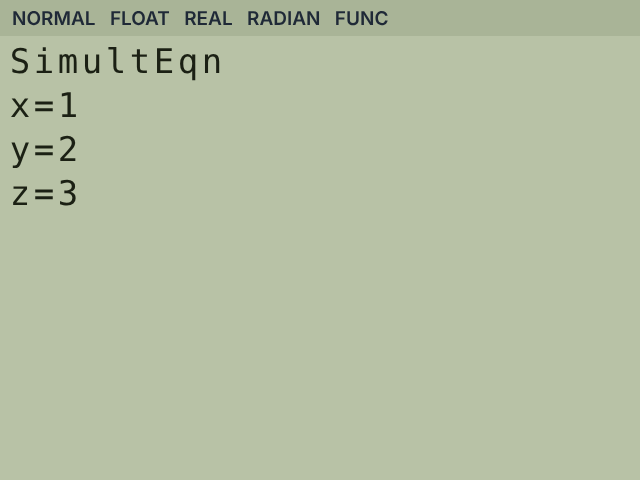
Move to Calculate and press ENTER. The answer is x = 1, y = 2, z = 3.
How to Graph on the TI-85 Calculator Online
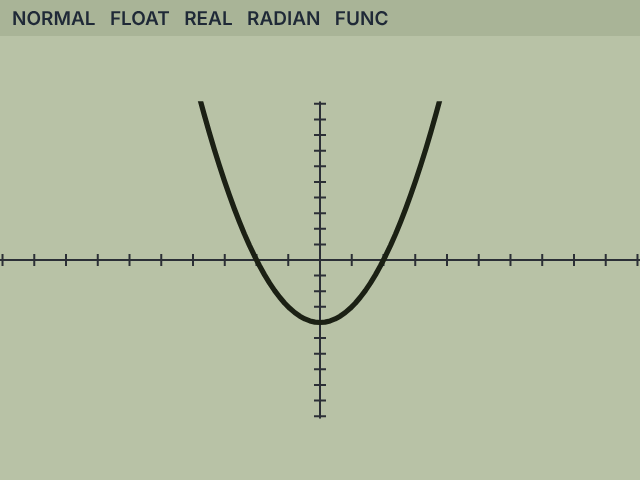
The graph screen is 127 by 63 pixels like the TI-85, so ZDecimal gives a window from −6.3 to 6.3. Example: y = x² − 4.
Enter the function
Press Y= and type X²−4 using X,T,θ,n.
Pick a window
Press ZOOM 6 for the standard −10 to 10 window.
Find the roots
Press 2nd TRACE, choose zero and set the bounds. The roots are x = −2 and x = 2.
TI-85 Practice Problems
Six engineering and calculus style problems. Every answer was checked on this calculator.
Quadratic roots
x² − 5x + 6 = 0
- APPS → PolyRoot, Order 2
- a2 = 1, a1 = −5, a0 = 6
- Calculate
x = 3 and x = 2
Two equations
2x + y = 5 and x − y = 1
- APPS → SimultEqn, Equations 2
- Row 1: 2, 1, 5. Row 2: 1, −1, 1
- Calculate
x = 2, y = 1
Area under sine
∫ sin x dx from 0 to π
- Check RADIAN in MODE
- MATH → fnInt(sin(X),X,0,π)
- Press ENTER
2
Slope at a point
Derivative of x³ at x = 2
- MATH → nDeriv(
- Type nDeriv(X³,X,2)
- Press ENTER
About 12
Matrix determinant
det of [[2, 1], [1, 3]]
- 2nd x⁻¹ → EDIT [A] as 2×2
- Enter 2, 1, 1, 3
- MATRIX → MATH → det([A])
5
Exponential equation
2ˣ = 10
- Type log(10)/log(2)
- Press ENTER
x ≈ 3.322
TI-85 vs TI-86 vs TI-84 Plus
The TI-85 graphing calculator and the TI-86 look almost the same. The TI-84 Plus is the model most schools use today.
| Feature | TI-85 | TI-86 | TI-84 Plus |
|---|---|---|---|
| Released | 1992 | 1997 | 2004 |
| Screen | 128×64 | 128×64 | 96×64 |
| Menus | F1–F5 soft keys | F1–F5 soft keys | Numbered lists |
| Polynomial and system solvers | Built in | Built in | As an app |
| Complex numbers | Yes | Yes | Yes |
| Still sold | No | No | Replaced by TI-84 Plus CE |
Quick answers about the TI-85
Is the TI-85 allowed on the SAT?
Yes. The TI-85 is on the College Board list of approved graphing calculators. Online calculators cannot be used in the test room.
Is there a TI-85 Plus or TI-85 Plus CE?
No. Texas Instruments never made one. You may be thinking of the TI-84 Plus CE. Try our TI-84 calculator.
Is the TI-85 calculator good for engineering?
Yes. It was built for engineering and calculus, with polynomial and system solvers, complex numbers and unit conversions.
What replaced the TI-85?
The TI-86, in 1997. It kept the same layout and added more memory and features.
Is this a TI-85 emulator?
It works like one, without a ROM. The math engine and screen are made from scratch, so nothing needs to be downloaded.
Is this TI-85 calculator online free?
Yes. It is free with no sign-up and no download.
More calculators online
Other models students use in class.
- GraphingTI-84 Plus CEColour graphing calculator with the same solversUse TI-84 calculator
- GraphingTI-83 PlusThe classic graphing calculator many schools still useOpen TI-83
- ScientificTI-30XS MultiViewFour-line scientific calculator used on the GEDOpen TI-30XS
- ScientificTI-30XASimple one-line scientific calculatorOpen TI-30XA
- ScientificTI-34 MultiViewMiddle school calculator with fraction toolsOpen TI-34
Frequently asked questions
Does this work exactly like a real TI-85?
The math, graphs and solvers give the same answers, and the screen matches the TI-85 size. The keys follow the TI-83 and TI-84 layout instead of the TI-85 F1 to F5 menus.
Can it do complex numbers?
PolyRoot shows complex roots, such as −1 + 1.732i. Typing complex numbers on the home screen is not available yet.
Can I use the TI-85 calculator on my phone?
Yes. The TI-85 screen and keys fit phones, tablets and Chromebooks, and nothing needs to be installed.
Is my work saved?
Yes. Functions, lists, matrices and solver entries stay in your browser, separate from our other calculators.
Is this TI-85 calculator made by Texas Instruments?
No. The real TI-85 has been discontinued for years. This is an independent TI-85 style calculator, not affiliated with, sponsored by or endorsed by Texas Instruments.