About TI-30XA Calculator Online
The Texas Instruments TI-30XA scientific calculator is the simple, one-line calculator that has been in pencil cases for decades. This TI-30XA calculator online copies its keys, its yellow 2nd labels and its single-line display, free in your browser.
Many teachers and colleges ask for a TI-30XA calculator because it is basic and not programmable. It handles fractions, powers, roots, trig, logs, statistics and memory without menus or extra screens. If your class requires it, this page lets you practise the exact key presses before a quiz or exam.
Middle schoolFractions, percents and order of operations.
Chemistry and physicsScientific notation, logs and trig.
Nursing and college classesCourses that only allow a basic scientific calculator.
Test prepPractise for exams that allow the TI-30XA.
TI-30XA vs TI-30XS MultiView
Both are TI 30X calculator models, but they work very differently. Check which one your class uses.
| Feature | TI-30XA | TI-30XS MultiView |
|---|---|---|
| Display | 1 line, shows only the current number | 4 lines, shows your problem and answer |
| Fractions | a b/c key, shown as 3⌟4 | Stacked like a textbook |
| Answer key | = | enter |
| Statistics | One list with the Σ+ key | Three lists, 1-Var and 2-Var Stats |
| Table of values | No | Yes |
| Memory | 3 memories (M1, M2, M3) | 7 variables (x, y, z, t, a, b, c) |
| Power | Battery | Solar and battery |
Need the four-line model? Use our TI-30XS calculator online.
How to Use a TI-30XA Calculator
The TI-30XA works one step at a time. You type a number, press an operation, type the next number and press =. It follows the order of operations for you, so 2 + 3 × 4 = gives 14. These keys are the ones that trip people up.
2nd
Uses the yellow label above a key. For example, 2nd then 2 gives %.
yellow labels
ON/C
Press once to clear the number you are typing. Press twice to clear the whole calculation.
clear
←
Deletes the last digit you typed, so you do not have to start over.
2nd ← → F◂▸D
+/− and −
+/− makes the number on screen negative. The − key is only for subtraction.
5 +/− → −5
EE
Enters scientific notation. 6.02 EE 23 means 6.02 × 10²³.
2nd EE → n
DRG
Switches between DEG, RAD and GRAD. 2nd DRG▸ converts the number on screen to the next unit.
angle mode
STO, RCL and Σ+
Store and recall numbers in three memories, and enter data for statistics.
memory and stats
How to Use Fractions on the TI-30XA (a b/c)
The a b/c key enters fractions and mixed numbers. The calculator shows a small ⌟ mark between the parts. Example: 5/6 + 1/3.
Type the first fraction
Press 5 a b/c 6. The screen shows 5⌟6.
Add the second fraction
Press +, then 1 a b/c 3.
Get the answer
Press =. The screen shows 1⌟1⌟6, which means 1 1/6.
Improper fraction
Press 2nd a b/c (d/c) to see 7⌟6, which means 7/6.
Decimal
Press 2nd ← (F◂▸D) to see 1.166666667. Press it again to go back to the fraction.

Mixed numbers: to type 2 1/2, press 2 a b/c 1 a b/c 2. The screen shows 2⌟1⌟2.
How to Find the Mean and Standard Deviation on the TI-30XA
The TI-30XA keeps one list of numbers for statistics. Example data: 4, 8, 15, 16, 23.
Clear old data
Press 2nd 7 (CSR). The Σ mark disappears from the screen.
Enter each number
Type 4 and press Σ+, then 8 Σ+, 15 Σ+, 16 Σ+ and 23 Σ+. The screen counts the entries: 1, 2, 3, 4, 5.
Get the mean
Press 2nd x² (x̄). The answer is 13.2.
Get the standard deviation
Press 2nd √x (σxn−1) for the sample standard deviation, about 7.396. For the population value, press 2nd ÷ (σxn), about 6.615.
Other results
2nd EE gives n = 5, 2nd ( gives Σx = 66 and 2nd ) gives Σx².
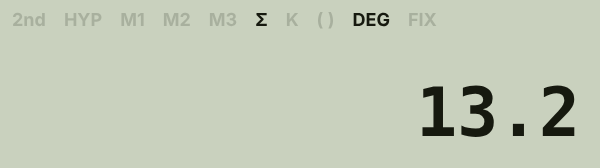
Repeated values: to enter 90 three times, type 90, press 2nd 1/x (FRQ), type 3, then press Σ+.
How to Use Memory on the TI-30XA
Memory saves you from typing long numbers again. The M1, M2 and M3 marks on the screen show which memories are in use.
| To do this | Press |
|---|---|
| Store the number on screen in memory 1 | STO 1 |
| Bring memory 1 back | RCL 1 |
| Add the number on screen to memory 1 | 2nd RCL (SUM) 1 |
| Swap the screen with memory 1 | 2nd STO (EXC) 1 |
| Clear memory 1 | 0 STO 1 |
TI-30XA Practice Problems
Six quick problems with the exact key presses. Every answer was checked on this calculator.
Order of operations
2 + 3 × 4
- Type 2 + 3 × 4
- Press =
14
Tip at 15%
15% of a $64 bill
- Type 15, then press 2nd 2 (%)
- Press × 64
- Press =
$9.60
Cube root
∛64
- Type 64
- Press 2nd 0 (∛x)
4
Scientific notation
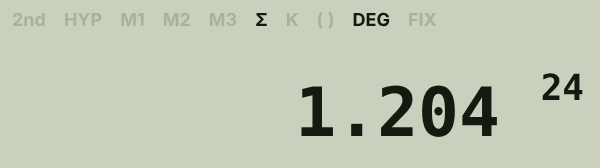
(6.02 × 10²³) × 2
- Type 6.02, press EE, type 23
- Press × 2
- Press =
1.204 × 10²⁴
Combinations
Choose 4 toppings from 10
- Type 10
- Press 2nd 8 (nCr)
- Type 4 and press =
210
Degrees to radians
Convert 180°
- Make sure DEG is on the screen
- Type 180
- Press 2nd DRG (DRG▸)
3.141592654 (π), now in RAD
Quick answers about the TI-30XA
Can you use a TI-30XA on the SAT and ACT?
Yes. Scientific calculators like the TI-30XA are allowed on both. Online calculators cannot be used in the test room.
Can the TI-30XA do fractions?
Yes. Use the a b/c key. It shows answers as fractions or mixed numbers and converts them to decimals with F◂▸D.
Is the TI-30XA a graphing calculator?
No. It is a basic scientific calculator with a one-line display. For graphs, use our TI-84 calculator online.
Is the TI-30XA the same as the TI-30X IIS?
No. The TI-30X IIS has a two-line display that shows your entry and the answer. The TI-30XA shows one number at a time.
Why does my TI-30XA show 3⌟4?
That is a fraction. 3⌟4 means 3/4, and 1⌟1⌟6 means 1 1/6.
Is this TI-30XA calculator free?
Yes. It is free to use, with no download and no sign-up.
More calculators online
Other models students use in class.
- GraphingTI-84 Plus CEGraphing calculator for algebra, statistics and calculusUse TI-84 calculator
- GraphingTI-83 PlusThe classic graphing calculator many schools still useOpen TI-83
- GraphingTI-85Older graphing calculator for calculus and engineering classesOpen TI-85
- ScientificTI-30XS MultiViewFour-line scientific calculator used on the GEDOpen TI-30XS
- ScientificTI-34 MultiViewElementary and middle school calculator with fractionsOpen TI-34
Frequently asked questions
Do I have to install anything to use the TI-30XA online?
No. Open the page and the TI-30XA keys are ready in your browser on any computer, Chromebook, tablet or phone.
Which computer keys work on the TI-30XA calculator?
Yes. Numbers, + − * /, ^ for powers, parentheses, Enter or = for equals, Backspace for ← and Esc for ON/C.
Why does the screen only show one number?
That is how the real TI-30XA calculator works. It shows the number you are typing or the latest result, not the whole problem.
Are my memories and data saved?
Yes. Memories, statistics data and settings stay in your browser until you clear them.
Is this TI-30XA calculator made by Texas Instruments?
No. It is an independent TI-30XA style calculator built for practice. It is not affiliated with, sponsored by or endorsed by Texas Instruments.